
Apple
Decoding macOS Security: A deep dive into XProtect and malware defense


The digital landscape is constantly evolving, and with it, the threats that target our devices. For Mac users, the built-in security suite, XProtect, stands as a crucial first line of defense. But how effective is it? What exactly does it protect against? This article delves into the inner workings of XProtect, exploring its components, detection methods, and the specific malware it targets, offering a comprehensive look at macOS security in 2025.
My journey into the world of macOS security has been a fascinating one. From attending security conferences in unexpected locations, like my trip to Kyiv for Objective-See’s Objective by the Sea v2.0, to engaging with leading security experts, I’ve gained invaluable insights into the ever-present battle against malware. This exploration culminates in a detailed examination of XProtect, a topic I began investigating last year and have continued to refine as Apple updates its defenses.
XProtect: More Than Just a Malware Blocker
Introduced in macOS X 10.6 Snow Leopard back in 2009, XProtect initially served as a simple malware detector, alerting users to potentially harmful files during installation. However, it has evolved significantly over the years. The 2022 retirement of the Malware Removal Tool (MRT) marked a turning point, paving the way for XProtectRemediator (XPR), a more sophisticated anti-malware component responsible for both detecting and removing threats.
XProtect’s strength lies in its use of Yara rules, an open-source tool that identifies malware based on specific patterns within its code or metadata. This allows Apple, and indeed anyone, to create custom detection rules.
Today, the XProtect suite comprises three key components:
- XProtect App: This component uses Yara rules to scan applications upon launch, modification, or signature updates, detecting known malware.
XProtectRemediator (XPR): XPR takes a more proactive approach, regularly scanning the system for threats using Yara rules and other methods. These scans occur in the background during periods of low activity, minimizing performance impact.
XProtectBehaviorService (XBS): Introduced more recently, XBS monitors system behavior, looking for suspicious activity related to critical resources.
The Challenge of Obfuscated Signatures
One of the challenges in understanding XProtect’s capabilities is Apple’s use of internal naming schemes for its Yara rules. While this obfuscation serves a security purpose, it makes it difficult to pinpoint the exact malware being targeted. For instance, while some rules have relatively clear names like XProtect_MACOS_PIRRIT_GEN (targeting Pirrit adware), many are given generic names like XProtect_MACOS_2fc5997 or internal codenames like XProtect_snowdrift.
This is where the work of security researchers like Phil Stokes of Sentinel One Labs and independent researcher Alden becomes crucial. Stokes maintains a public repository on GitHub that maps Apple’s obfuscated signatures to common malware names recognized by security vendors and public scanners like VirusTotal. Alden has made significant strides in understanding XPR’s functionality by extracting Yara rules directly from its scanning modules.
Locating XProtect on Your Mac
XProtect is enabled by default on all macOS installations and operates silently in the background. Updates are also automatic. To locate XProtect on your system:
- Open Finder and navigate to Macintosh HD > Library > Apple > System > Library > CoreServices.
- Locate “XProtect” and right-click (or Control-click).
- Select “Show Package Contents.”
- Navigate to Contents > MacOS.
Important Note: While XProtect provides a solid baseline of protection, it primarily focuses on known threats. Relying solely on XProtect is not advisable. Employing reputable third-party anti-malware solutions is strongly recommended for enhanced security.
XProtectRemediator v147: A Look at the Malware Arsenal
XPR’s scanning modules are responsible for malware removal. Examining version 147 reveals a targeted approach against a variety of threats. Here’s a breakdown of some of the identified remediators:
- Adload: This adware and bundleware loader has been targeting macOS users since 2017, demonstrating a persistent threat. Recent XProtect updates have significantly improved the detection of this malware.
- BlueTop: Identified as a Trojan-Proxy campaign documented by Kaspersky in late 2023.
- ColdSnap: Likely targeting the macOS version of the SimpleTea malware, a Remote Access Trojan (RAT) with ties to the 3CX breach and similarities to Linux and Windows variants.
- Crapyrator: Identified as macOS.Bkdr.Activator, a large-scale malware campaign discovered in February 2024, potentially aimed at creating a macOS botnet or distributing further malware.
DubRobber (XCSSET): A versatile and concerning Trojan dropper.
- Genieo: A widely known potentially unwanted program (PUP).
KeySteal: A macOS information stealer first observed in 2021 and added to XProtect in February 2023.
- Pirrit: An adware family known for injecting ads, collecting browsing data, and manipulating search results.
- RankStank: Linked to the 3CX supply chain attack attributed to the Lazarus Group.
- SnowDrift: Identified as the CloudMensis macOS spyware.
- Trovi: A cross-platform browser hijacker similar to Pirrit, known for redirecting searches, tracking browsing history, and injecting ads.
Several other remediators, such as BadGacha, CardboardCutout, FloppyFlipper, GreenAcre, RoachFlight, SheepSwap, ShowBeagle, ToyDrop, and WaterNet, remain unidentified at this time, highlighting the ongoing effort to decipher XProtect’s full capabilities.
The Ongoing Evolution of macOS Security
The fight against malware is a constant arms race. Apple continuously updates XProtect to address emerging threats, and security researchers work tirelessly to uncover the intricacies of its defenses. By understanding the components and capabilities of XProtect, Mac users can gain a deeper appreciation for the built-in security measures and make informed decisions about their overall security posture. While XProtect provides a valuable layer of protection, combining it with reputable third-party security software remains the most effective approach to safeguarding your Mac in today’s complex digital world.


Moving from an Android phone to an iPhone—or the other way around—can often feel like a big chore. Right now, when you get a new phone, moving all your important information over from the old phone can be a complicated mess. However, it seems that Google and Apple are working together to fix this, making the switch between the two types of phones much smoother.
We recently got a sneak peek into the future by looking closely at the code of Google’s Android Switch app. This app is what helps people move their data from an iPhone to a new Android device, like a Pixel. What we found inside the hidden code suggests that several new types of personal information might soon be able to transfer automatically.
Currently, when you switch phones, basic items like photos, videos, contacts, and calendar dates usually move over. But things that make your phone yours often get left behind.
The new code hints that the following items could soon be included in the transfer process:
- Accessibility Settings: These are the special settings people use to make their phone easier to operate, such as larger text sizes or specific display settings. Being able to transfer these means you won’t have to spend time setting up your phone just to be able to use it comfortably.
- Music Playlists: If you have music lists on your iPhone, the updated system might allow them to move to a service like YouTube Music on your Android device.
- Passwords and Passkeys: This is a big one. Right now, you usually have to sign back into every single app manually. Soon, the system could automatically bring over your saved login details and newer “Passkeys,” providing a truly seamless experience.
- Wallet Cards: Moving credit and debit cards from one digital wallet (like Apple Wallet) to another (like Google Wallet) is not possible today, but the code suggests this convenience could be added.
- Wi-Fi Credentials: While your phone might remember the name of your home Wi-Fi, it often doesn’t remember the password, forcing you to type it in again. The change suggests the actual Wi-Fi passwords will transfer over, making it so your new phone connects instantly.
It’s important to remember that this information comes from looking at code that hasn’t been released yet. So, while it shows what Google and Apple are planning, we need to wait for an official announcement to know exactly how and when these improvements will become available.
Since the two companies are working together, these features are likely to help users switch from Android to iPhone, too. Once these changes arrive, getting a new phone won’t mean starting from scratch anymore.
A key screen supplier, BOE, is running into serious trouble providing the special display panels (OLED screens) for Apple’s newest phone lineup, the iPhone 17. Because of these technical setbacks, a main competitor, Samsung Display, is now expected to land a much bigger supply deal with Apple.
Sources familiar with the matter confirm that BOE has faced quality control and technical difficulties that it has not yet managed to fix. This means the company will be unable to deliver the display panels it was planning to ship this year. As a direct result, Samsung Display will likely be stepping in to cover the missing supply needed to build the phones.
The iPhone 17 is Apple’s current flagship model and is available in four versions: the standard, Air, Pro, and Pro Max. Apple is expecting to ship more than 90 million units of this new series throughout the year. The screens for these devices are usually provided mainly by Samsung Display and LG Display. At the moment, Samsung provides displays for all four models, while LG supplies three of the versions, not including the Pro.
BOE had originally planned to provide screens, specifically for the high-end iPhone 17 Pro models in the Chinese market. The main issue stems from Apple’s decision to use a more advanced screen feature called LTPO across the entire iPhone 17 series this year. This proved to be a major hurdle for BOE, which did not have prior experience making LTPO panels for Apple.
After many months of work, BOE finally received approval to start large-scale production in the early third quarter, to supply up to ten million panels. However, problems with reliability kept happening. By mid-November, these ongoing issues were still not solved. Due to these failures, BOE’s expected total shipments, which could have reached 40 million screens, will now be significantly lower.
Samsung Display is currently bridging this gap. Its screen supply to Apple is expected to increase from an initial 80 million panels to roughly 90 million this year. This is a critical move that will ensure Apple can still meet its manufacturing targets for all four iPhone 17 models without delay.
With BOE struggling to deliver, Samsung Display is now set to further solidify its position as Apple’s most important partner for OLED screens. The company stands to gain more business and maintain its lead in the competitive iPhone screen market throughout 2025.
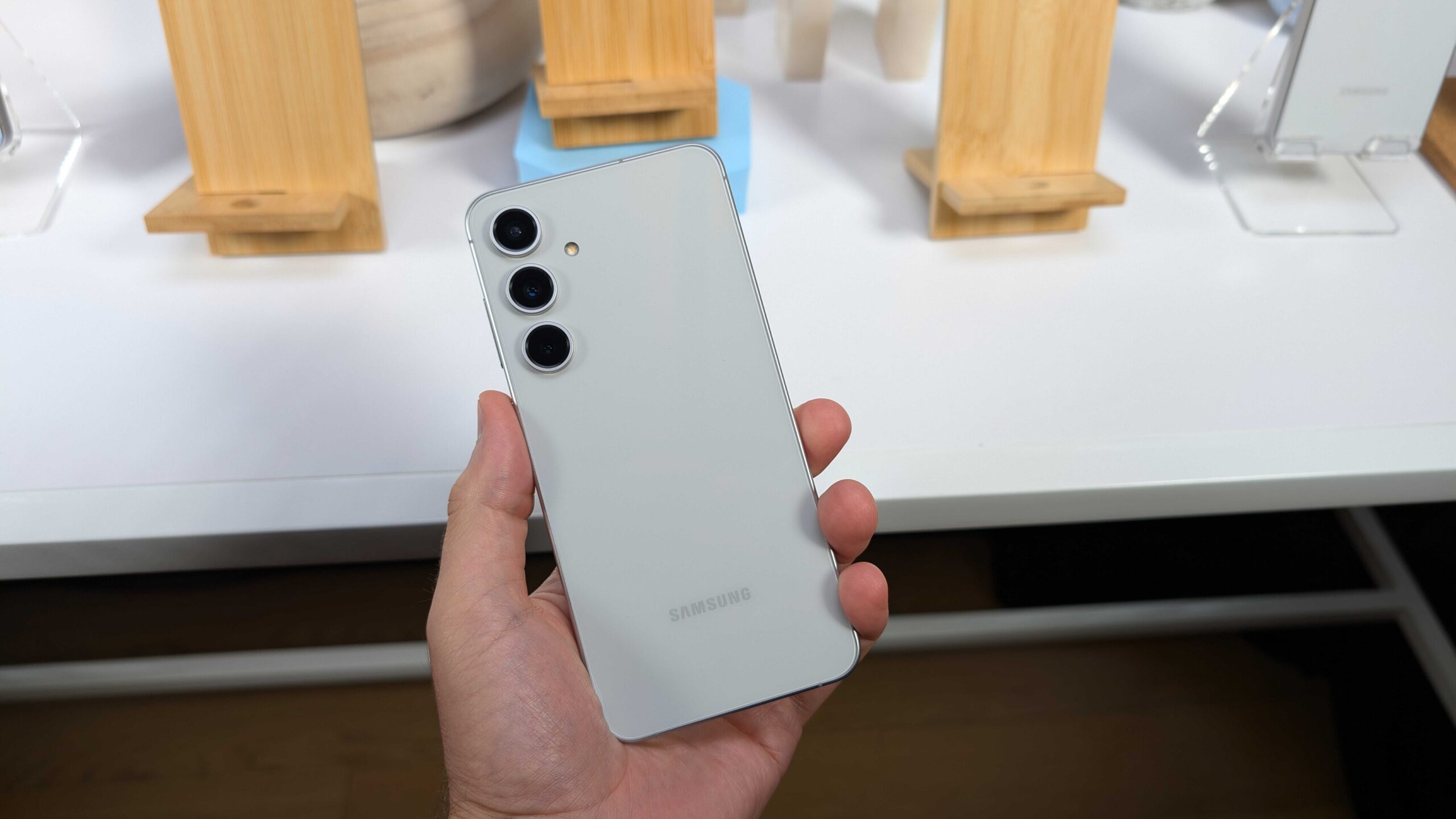
Samsung has been busy with its phone lineup lately. Just a short time after bringing out the Galaxy S25 FE, the company is already pushing its very first software fix to users. This mid-tier flagship is the last piece in the Galaxy S25 family puzzle, joining the regular trio and the slim Galaxy S25 Edge model.
The update is starting in Europe and should spread to other places soon. Folks with the Galaxy S25 FE won’t have to hold out for the newest software skin right away, since it came loaded with One UI 8 from day one – one of the rare Samsung phones to do so. This fresh patch carries the build number S731BXXU1AYIB.
It packs in the September 2025 security fix, along with tweaks for smoother running and better protection overall. The patch tackles a bunch of weak spots in the system that could let hackers in. Samsung has already sent this same September update to plenty of other phones worldwide.
Don’t look for any flashy new tricks here, though. Those are saved for the bigger One UI 8.5 jump, which early peeks suggest could bring some real changes. Shifting gears to what’s next, Samsung’s popular Galaxy A5x line keeps drawing crowds with its smart mix of features and wallet-friendly prices.
The Galaxy A56 only hit shelves a few months back, but word is already out on its follow-up, the Galaxy A57.Spotters caught the Galaxy A57 in the IMEI database, listed under the code SM-A576B/DS for the two-SIM version. It’s no big shock, as Samsung sticks to a yearly refresh for these hits.
Rumors point to the Galaxy A57 running on the fresh Exynos 1680 processor. Test scores show it packs a revamped brain for tasks and a graphics part that’s twice as strong as the one in the A56’s Exynos 1580. That could mean smoother games and quicker everyday stuff. The camera side might get a boos, too, though details are still fuzzy. Based on past patterns, expect the Galaxy A57 to drop in the early months of 2026, keeping the mid-range magic alive.
Galaxy A57 5G SM-A576B/DS spotted😁 pic.twitter.com/zsD5YHf0xE
— Erencan Yılmaz (@erenylmaz075) September 25, 2025
-

 News7 months ago
Samsung expands One UI 8 updates with new camera support, watch upgrade, and wider testing
-
 News7 months ago
Samsung testing One UI 8.5 on Galaxy A26 as Good Lock updates begin
-
News7 months ago
Samsung begins testing One UI 8.5 on Galaxy S22, Tab S9, and popular A-Series phones
-
 News7 months ago
Samsung Galaxy S26 and S28 to feature custom graphics alongside new Galaxy Buds 4 Pro
-

 News7 months ago
Samsung’s new three-way Folding phone faces real-world toughness tests
-

 News7 months ago
Samsung’s future phones to feature better satellite tech and powerful new chips
-
News7 months ago
Samsung tests new One UI 8.5 update on more phones
-

 News7 months ago
Google Updates: Quicker Photos Search, new emergency tools for India, and AI for your car